Photo Products to Watch in 2008

By leelefever on January 8, 2008 - 7:01pm.

8 comments

2008 is shaping up to be a interesting year to try out new things when it comes to digital photos. From photo transfer technology, to wall hanging, to photo sharing services, here are a few things I'll be using in 2008.

Eye-Fi

I consider Eye-Fi a magical piece of photo technology. It makes it possible for me to upload photos to Flickr (or other services) and to my computer directly from my camera using my wi-fi network - no wires, no card readers.  Once it's installed, you just shoot a photo and within seconds the photo magically appears on the web and my computer.

Update:  I use Eye-fi on my home wi-fi network - when I arrive home,  the camera starts uploading as long as the camera is on. I set it to upload to Flickr as "private" and then change permissions as needed.
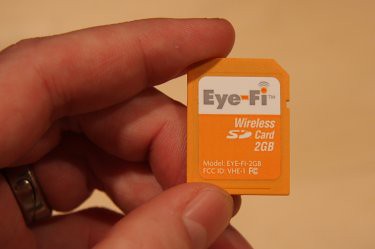
For SD memory cameras, you just replace your SD card with the 2gb Eye-Fi SD card and load the software on your computer.  Once it's set up, the Eye-Fi SD card makes it possible to transfer photos automatically.  If you don't have an SD camera, you can use the Eye-Fi card with a Compact Flash adapter too. I first heard about Eye-Fi from Anastasia of Juxtaprose and this year, it was a Christmas gift from my Mom. Thanks Santa!

Fotoflōt

Last year I gave Flickr's photo printing service a try and was impressed.  I get so used to seeing photos online that I forget about how they look on a wall. Just recently I came across fotoflōt - which takes photos and wall mounting to a new level. 

Two things I love about fotoflōt:

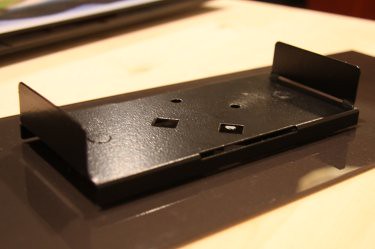
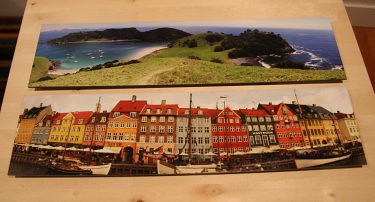
1.  Frameless design and photo protection.  They print your photos on high quality photographic paper and then fuse it to 1/8" thick acrylic. This makes them low reflection, low glare and high durability. I printed some of our travel panoramas.

2.  Magnetic wall mounts.  Each fotoflōt comes with a wall mount that makes the photos modular.  Once the mounts are in place, you can have a number of fotoflōt photos and switch them out in seconds.


Right now, fotoflōt is working directly with Smug Mug, a photo sharing service.  In fact, in order to use fotoflōt I had to upload my photos to Smug Mug first.  This may change soon.

SmugMug

Either way, it gave me a reason to try out SmugMug and I'm impressed so far.  SmugMug is a bit more professionally oriented (and expensive) than Flickr, and I'm not a pro, but here are a few things I dig about SmugMug.

Photos really do look good on SmugMug
.  Maybe it's the black background or pixie dust, but I love how my photos look there.

Nice options
.  I like the new Picnik integration on Flickr better, but SmugMug provides a few options for online photo editing. If you become a power user (59.95/yr), you can even upload videos to your account.

Build a store. If you become a Pro user (149.95/yr) you can make SmugMug a platform on your domain. This means that I could use SmugMug to create LeesPhotoStore.com and sell my photos.  They keep 15% and handle support and technical details.

The SmugMug attitude. I love their story of passion, family, being small and living a dream.

So these are a few products I plan to use this year.  Maybe you have more?

(My Flickr account

thanks for sharing...

good thought Lee - I last printed a round of poster prints back in 2002, been a long time since and there are quite a few that I would really like to see on my wall.

Also, I haven't looked at SmugMug in a while and am very glad to read your write up - its worth another look. If I could only sell a few photos, I might be able to get those fine pieces of glass I have been hoping to buy.

Sweet!

Lee - Thanks for sharing. I am really thinking about the possibility of fotoflot. It looks like great quality and an excellent hanging mechanism. thanks!

I didn't even know about

I didn't even know about them...

All your photos to Flickr?

Great post Lee -- I'll check out eye-fi today!

If I read you correctly, you upload all your pictures to Flickr automatically? Can you explain more about how that works?

- is Flickr your 'source' location for all your photos or do you also keep local copies.

- do you resize your photos prior to uploading. If so, is there an automatic way to do this?

I've been thinking of putting all my photos on Flickr for the tagging features but haven't worked out how to manage the hundreds of pictures clogging my local hard drive.

Thanks!

Flickr as Source

If I read you correctly, you upload all your pictures to Flickr automatically? Can you explain more about how that works?

For a few years now, I've been putting photos on Flickr. Usually, I use the Flickr Uploadr which makes it easy to move photos from my computer to the site. Eye-fi makes it automatic - it goes right from the camera to Flickr - no computer involved. You lose some options, but it works.

is Flickr your 'source' location for all your photos or do you also keep local copies?

I keep local copies on my computer (or external hardrive). The photos that appear on Flickr, for the most part, are ones I want to share or archive. I have over 14,000 photos on Flickr. Thank goodness for tags. :)

do you resize your photos prior to uploading. If so, is there an automatic way to do this?

Using Flickr's upload tools, you can have them resized as a batch if you prefer. However, I think it's a good idea to archive them in large format if you plan to use them in the future - with a "pro" account storage is unlimited. Also, Flickr recently integrated Picnik online photo editing that enables you to resize photos via Flickr.

Hope this helps! We've got some photo-related video-goodness coming out very soon!

SmugMug for photo sharing

Hey Lee, we set up some clients on SmugMug as a subdomain and they're enjoying it. They run a motorcycle tours company called Rocky Mountain Motorcycle Holidays and wanted a way to post their own photos, and also let their guests share their photos.

We used the subdomain setup and created a gallery of motorcycle tour photos integrated into the overall site. The only complaint I'd have is that sometimes the SmugMug site seems slow, particularly when we first set the account up.

Apart from that though, it's been a great experience and the only service we could find that allowed non-members to contribute photos.

easy to integrate

Smugmug was a great tool for our client because we could integrate it with the existing site by adding our CSS to Smugmug. I don't feel like a programmer and yet I was able to easily set this up. Yay Smugmug. There are some quirks with the user help but once you understand what is intuitive to how Smugmug does things it's ok.

Eye-Fi

eye-fi is creatively built. i hope it will be available here in malaysia in a few months!

Post New Comment

The content of this field is kept private and will not be shown publicly.
The Common Craft name and logo are trademarks of Common Craft, LLC. © 2007
All blog posts and Common Craft Show videos are Creative Commons Licensed